A paper-thin flexible tablet computer
January 9, 2013
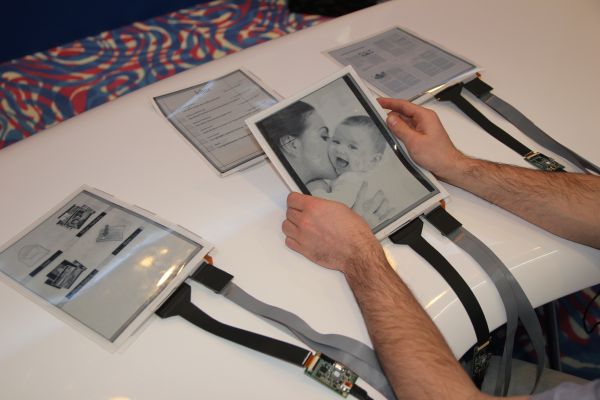
PaperTab (credit: Plastic Logic/Queen’s University)
A flexible paper computer developed at Queen’s University in collaboration with Plastic Logic and Intel Labs could one day revolutionize the way people work with tablets and computers.
The PaperTab tablet looks and feels just like a sheet of paper. However, it is fully interactive with a flexible, high-resolution 10.7” plastic display developed by Plastic Logic, a flexible touchscreen, and powered by the second generation Intel Core i5 Processor.
Instead of using several apps or windows on a single display, users have ten or more interactive displays or “PaperTabs”: one per app in use.
“Using several PaperTabs makes it much easier to work with multiple documents,” says Roel Vertegaal, Director of Queen’s University’s Human Media Lab. “Within five to ten years, most computers, from ultra-notebooks to tablets, will look and feel just like these sheets of printed color paper.”
For example, PaperTab’s intuitive interface allows a user to send a photo simply by tapping one PaperTab showing a draft email with another PaperTab showing the photo. The photo is then automatically attached to the draft email. The email is sent either by placing the PaperTab in an out tray, or by bending the top corner of the display.
Similarly, a larger drawing or display surface is created simply by placing two or more PaperTabs side by side. PaperTab thus emulates the natural handling of multiple sheets of paper by combining thin-film display, thin-film input and computing technologies through intuitive interaction design.
PaperTab can file and display thousands of paper documents, replacing the need for a computer monitor and stacks of papers or printouts. Unlike traditional tablets, PaperTabs keep track of their location relative to each other, and the user, providing a seamless experience across all apps, as if they were physical computer windows.
For example, when a PaperTab is placed outside of reaching distance it reverts to a thumbnail overview of a document, just like icons on a computer desktop. When picked up or touched a PaperTab switches back to a full screen page view, just like opening a window on a computer.
PaperTabs are lightweight and robust, so they can easily be tossed around on a desk while providing a magazine-like reading experience. By bending one side of the display, users can also navigate through pages like a magazine, without needing to press a button.
Plastic Logic and the Queen’s University’s Human Media Lab unveiled PaperLab at the International Consumer Electronics Show (CES 2013) in Las Vegas on January 8.
Comments (16)
by Cybernettr
“Within five to ten years, most computers, from ultra-notebooks to tablets, will look and feel just like these sheets of printed color paper.”
This kind of flies in the face of Ray Kurzweil’s prediction that well before that time “computers will disappear as distinct physical objects.” A computer screen, even a flat , flexible one, is still a distinct physical object.
I agree with Kurzweil. With augmented reality and virtual reality, why will we need flexible computer screens? Even rolled up, they are not that easy to carry.
The technology is impressive, but perhaps it can be put to other uses. About the most interesting use I’ve heard is a t-shirt that changes messages, perhaps “I’m with stupid” with an arrow that points in either direction, depending on who you’re walking with.
by Mostly Foobar
Does the display use that technology called digital ink? If it does then the display is static with the power turned off (meaning the last image on the device remains when the power is disconnected.)
Just a thought, but I sort of love the idea that you could pop this thing into a photocopier and make a copy of whatever’s on the screen.
maybe an email is more functional ultimately. But the photocopier thing is intriguing.
And we need to be able to plug a thumbdrive into it… plugs into the top of the stylus? Maybe the stylus also has a battery in it and transfers power to the paper when they touch? Or vice-versa if the paper is on a charging surface (desk, piano, music stand…)
It would be super cool to have a thumb-drive full of sheet music you could just plug into the display. Set it on the music stand (which is connected to speakers?) and then your sheet music could have a play button on it… not sure how that part sounds…? highlight it, hit the play button….
I am leery of the deformation gesture concept… traditional pen and multi-touch gestures are coming along nicely on tablets etc.. deformation gestures would seem to introduce the possibility of stuff happening while you’re putting the things away, storing them, etc. Bah! I’m sure I’m worrying about nothing. They’ll debug the deformational stuff.
Anyway, its an intriguing concept. especially in a collaborative context. Not so much maybe as a standalone device (tablets are becoming prety good standalone devices), but music for a piano or music stand, checksheets that interact with machinery they are designed for, feedback forms posted at events… cheap advertising (if they get super cheap)…
lots of possibilities.
@Editor: don’t get frustrated with people complaining about lack of polish. Seeing stuff at this stage of development (and even earlier) is why I subscribe to this newsletter…
by Hackworth
Now make an input device that looks like a fountain pen.
by Ronald N. Cooke
With icons that change font, color, and size.
by vedat
This may become a brillant education instrument at schools; cheap, cool, foldable, kind a fun for students interacting with each other. Furthermore it may revolutionise the garment industry, not tele-tubby-wise, but a wearable screen? good work, keep committing on this
by Amir
It is a true revolution for ebook readers and tablets. Of course, it needs to become more mature (become wireless, use wireless charging, touch screen etc …) but I think it is (in this form or some evolved form) the future of the paper. The evolution of paper, into something more intelligent and yet easy and natural to use
by tedhowardnz
I can think of one very powerful use for linked pads – my wife is a classical pianist, and would love to have her music collection digitised and available for display on at least 3 screens, with suitable “page turning”.
Have yet to find anything that fits the bill (light, portable, reasonably priced).
by deardavid
Great idea!
by Greg
It’s not a computer, it’s just a display. Cool stuff but call me when it really is a computer. A bunch of thin displays connected to cumbersome cables? This is an advance? You can see in the demo how uncomfortable it is to type on the virtual keyboard. Not to be a naysayer , it is cool beans for sure but will be super cool when the displays are not attached to a big box hidden under the desk.
by GatorALLin
..in order to reply to the email you had to dog ear the paper….. this sounded like having to learn a new set of tricks to interact with these tablets, when I wish they would use the hand gestures or other common buttons we are already trained to understand by instinct or by vision. Clearly the cables were heavy and awkward and may weigh 4x as much as the tablet itself. Maybe they can have the desktop power all future tablets of this kind, or store a bit of battery in them so you can lift them off the surface for hours and then when they lay flat on the desk again they auto recharge, etc… (or are wireless). Cool to see the thin paper like devices, but seems like this is still in the awkward development stage and may get stuck here as iPads and other devices get faster/thinner/cheaper/easier to use.
by fattie
This concept was actually invented on the cheesy, hugely selling, iPad game “Pad Racer” (padracer.com),
where you can put iPads together, draw a 2D racetrack (1980s style -”Super Sprint”), and racer over head, across the iPads.
“Pad Racer” was a fad, it was released when the iPad 1 was first released.
Many similar “connect two iPad” games followed, to capitalise on the idea.
(Note that the Scrabble app on iPad – actually, in fact by far the #1 best selling iPad app of all time – does a similar thing. it’s not exactly a novel idea.)
I LOVE these paper-thin displays; the idea of making “pads that link together” is just cheesy and silly.
by melajara
Offloading what was intellectual tasks to computers had this pernicious effect to induce a collective regression in human global reasoning abilities.
I mean what was before the highest form of intellectual practice i.e. abstract and hypothetico-deductive reasoning requiring imagination on “intuited objects” has now regressed in yet another form of concrete operations (the stade preceding formal operations in the Piagetian scale of intelligence evolution) exercising like e.g. “click here”, “drag there” and so on (on hateful modal interfaces) as been exemplified by the computerized (and aging) “desktop” metaphor.
With the demonstrated work, we are yet a further step down this path, not even inhabiting an (abstracted) world of concrete operations but more and more a sensori-motor one (hence further regression). Quite literally, here we are required to have tablet B be touched by tablet A to have a typical workflow been continued. Oh, very well, now you’ll need to buy at least 2 tablets to compose and send an email, a sure way to promote further growth of a market segment about to stall in a world where everybody soon enough will have his/her tablet. Even better, we’ll be required to have n tablets for a workflow in n steps, this is sheer economical genius, what a wonderful world!
Instead of this stupidity (notice how awkward the keyboard is, so much that in the demo the answered email consists of 4 letters only, i.e. “done”), I would like to see design teams and developers actually THINK of a better way to use the sheer ever increasing power of a tablet’s (or eReader’s) CPU and memory by organizing the documents in a way to have them, all the relevant ones, easily accessible and better organized.
Consider for example, that the Kindle still has no proper folders or way to index your ebook library by theming (metadata) or to sort them along various usual filters like e.g. author’s name, publisher’s name, publishing date, Dewey decimal classification index etc.
What a moronic world!
by Devin
They will get there, knocking this otherwise brilliant invention is plain silly.
by Alex Kulay
Why not replace the cable Wi-Fi Alliance for wireless networks based on the standard IEEE 802.11.? :)
by Editor
This is a lab prototype.
by Steve
Will it ever be more than a lab prototype? Plastic Logic doesn’t exactly have the best track record in that regard.